Ideas lose their place
In a standard chat, related thoughts pile up in sequence instead of staying attached to the right branch of the project.
AI mind mapping
OutThread combines a simple mind map interface with contextual AI chat. You can build structure manually or with AI help, then keep each conversation grounded in the selected node and project state.
Sign in takes you straight into the app so you can try this workflow in a real OutThread workspace.
Node-aware
AI context
Chat can stay anchored to the selected branch.
Manual + AI
Editing model
You can mix direct editing with assisted expansion.
Project-scale
Workspace shape
Useful for planning, decomposition, and exploration.
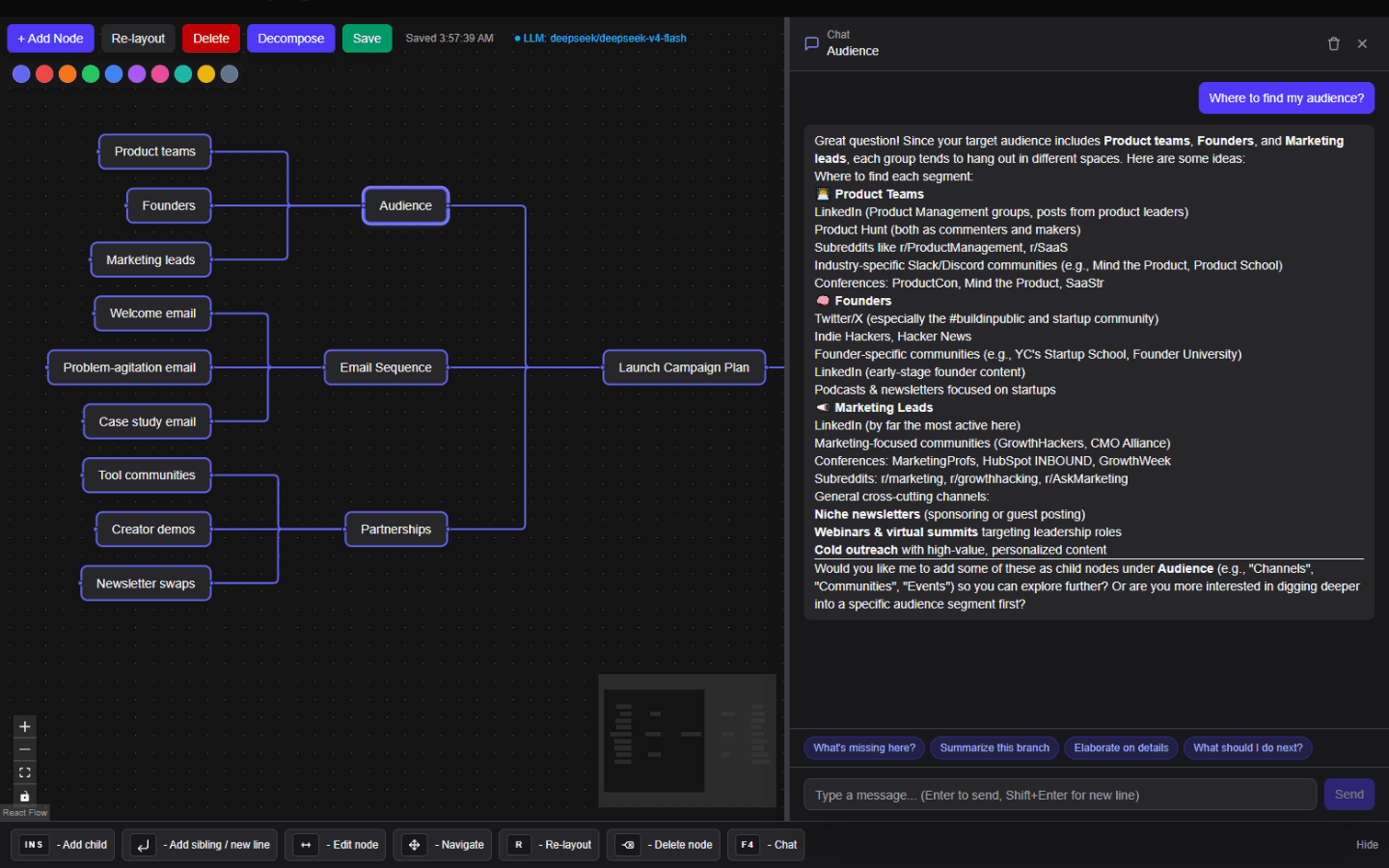
AI mind map screenshot
This hero screenshot shows a real OutThread planning map where branches stay organized and ready for contextual AI follow-up at the node level.
Problem and solution
People searching for AI mind maps usually want more than a blank canvas and more than a plain chatbot. They need a place where structure and assistance reinforce each other.
In a standard chat, related thoughts pile up in sequence instead of staying attached to the right branch of the project.
Users end up re-explaining the same subtopic because the assistant cannot see the map structure they are working from.
One tool holds the structure, another tool holds the conversation, and the handoff between them is clumsy.
Workflow
This page now explains the product around a clearer query intent: mind mapping with AI that stays aware of context.
Start from a topic, project, or problem and shape the main branches of the work visually.
Select the part of the map you want to refine so the conversation stays attached to the right local context.
Use chat to clarify, decompose, or extend the branch, then keep editing the map as the structure improves.
Benefits
The map and the assistant support the same workflow instead of competing for context.
The assistant can respond with awareness of the selected node and surrounding project structure.
Ideas stay organized spatially, which makes decomposition and comparison easier.
You can start manually, use AI selectively, or let both methods alternate as the project grows.
Planning, restructuring, and follow-up conversation happen in one place instead of scattered tools.
FAQ
These answers sharpen intent coverage while keeping the page useful for real readers.
Yes. OutThread is not locked to auto-generation. Manual editing and AI-assisted expansion are meant to work together.
The conversation can stay anchored to the selected node and project structure, which keeps responses more relevant than a generic blank chat.
No. It also fits planning, decomposition, research organization, and multi-branch project work where local context matters.
Related use cases
Final CTA
Sign in to build an AI mind map in OutThread and keep each follow-up conversation attached to the right branch.